
Learn ›
Bucks and sightings
The Bucks tab is a grid of the bucks you're tracking. Tap one to open his profile: photos and videos by season, his patterns, his movement, his likely bedding and his notes.
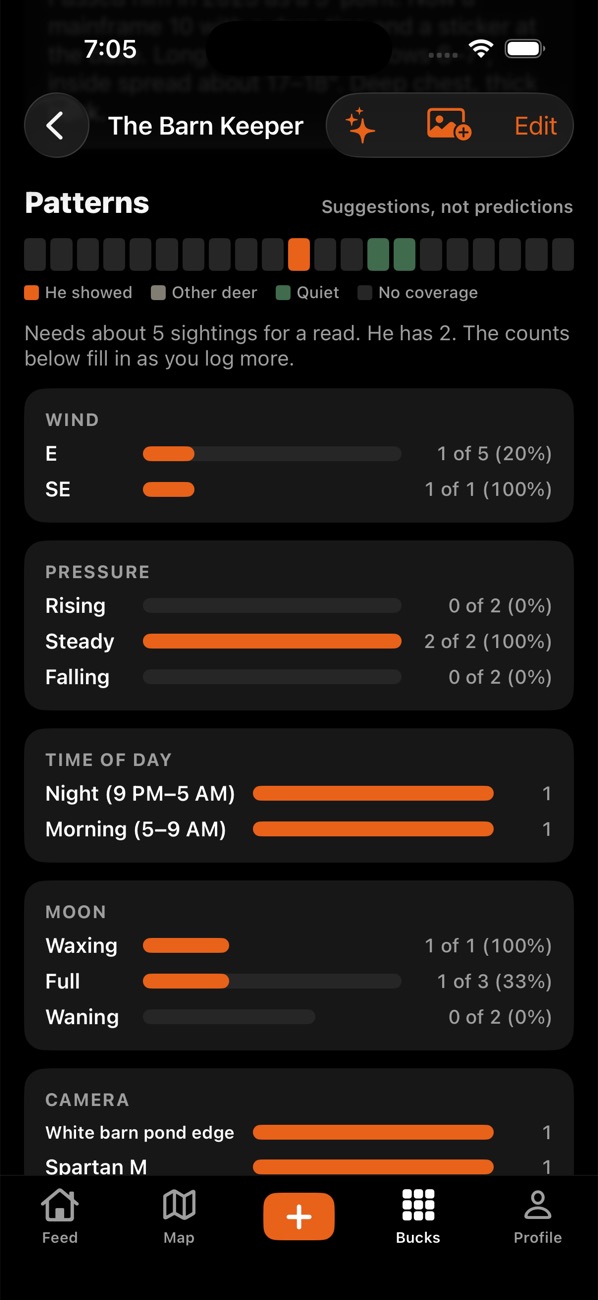
- To add a buck, go to Bucks and tap +, give him a name, then add his photos (or tap No photo: I saw him).
- Open a buck to see Photos and videos by season, side by side across years.
- Scroll to Patterns: sightings by wind, time of day, pressure, moon and camera, and Movement in shooting hours (how often he's on camera in shooting light, and under what conditions). These are suggestions from your data, not predictions; they get better with more sightings, and quiet days (no buck on a working camera) count too.
- Tap the pencil to edit his name, age, score estimate, status (alive, harvested, found dead and so on) and notes.
- To size him up, use the free tap-through estimator (points, spread, beams, mass) for a rough gross score and age.
- To share him, tap Share his profile: you pick the photos and the app makes one picture. Camera names are off unless you switch them on.
Tips:
- On a sighting you can set which way he came from and left toward. The bedding estimate and in and out trails use it.
- The Free plan tracks 3 bucks in all (your own and crew bucks). Pro is unlimited.
- On the Bucks tab, the season menu shows the bucks seen in a given season.
- "Describe from photos" (All Access) sends only the photos you pick to the AI to write up his rack and body. It asks first.
Something not working? Ask the help chat (bottom right), or email support@borrowedtine.com.