
Learn ›
The map: pins, stands and wind
The Map shows your property on satellite with your cameras, stands and sign. Across the top: the property menu and the buck movement menu. The tool row: Lines (or Owner), Pins, Layers, Best sits and Guide.
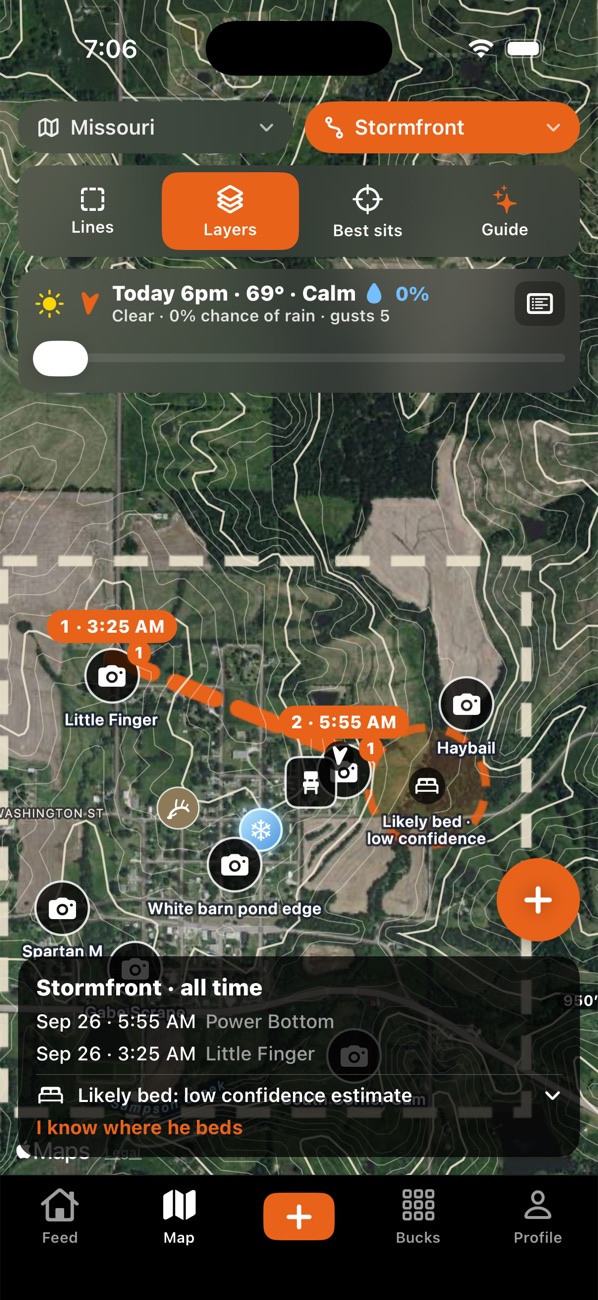
- Pick your property at the top.
- To add a camera, stand or sign (scrape, rub, bedding, food, water, access and more), tap the +, line up the crosshair, and choose what's there. Pin where I'm standing uses your location.
- Tap a stand and set its good winds for mornings and evenings. The map then rates every stand Good or Bad for the wind in the forecast strip, like "SE Good".
- Swipe the forecast strip at the top to pick an hour; the stand ratings follow it. Night hours show the moon, and the strip shows first and last light.
- Tap any pin for its sheet: edit, Move this pin, Retire it (hides it but keeps every sighting and sit), share it, or delete it.
- Pins chooses which kinds of pins show. Buck movement at the top draws one buck's sightings in time order, with in and out trails (Pro).
Tips:
- Your blue dot shows the way your phone is pointing. If it's missing, allow Location for Borrowed Tine in your phone's settings.
- Scrapes near a camera turn warm, hot or "on fire" as your hit-list bucks visit; cold ones look icy (hot scrapes are Pro).
- Delete is for mistakes. Retire a camera you moved so its history stays.
Something not working? Ask the help chat (bottom right), or email support@borrowedtine.com.